GitHub Actions for Beginners: Reusable Workflows, Composite Actions, and Self-Hosted Runners
Part 5 of 5 in a series that takes you from your first workflow to production-grade automation.
Are you maintaining the same YAML in more than one place?
By now you have a pipeline that tests, secures, and deploys your code. You also have a lot of YAML, and if you look closely, much of it is repeated. The same checkout and install steps appear in every job. The staging and production deployments are near-copies of each other. Fix a bug in one, forget the other, and the two quietly drift apart.
This last post is about removing that repetition, and about taking control of the machines your jobs run on. It answers four questions:
- How do I write a job once and use it everywhere? That’s reusable workflows.
- How do I share a few repeated steps? That’s composite actions.
- Where should my jobs run? That’s GitHub-hosted versus self-hosted runners.
- What breaks first? That’s the common errors at the end.
By the end of this post, you’ll have replaced the two near-identical deployment jobs with one reusable workflow called twice. You’ll also know when your own runners are worth the effort.
Three ways to avoid repeating yourself:
| Option | What it shares | Used from | Typical use |
|---|---|---|---|
| Reusable workflow | One or more whole jobs | A job (uses: on the job) |
Deploy, release, full pipelines |
| Composite action | A list of steps | A step (uses: on a step) |
Setup and other small repeated steps |
| Template repository | A starting copy of files | Copied once | New projects (copies don't stay in sync) |
1. Reusable workflows:
A reusable workflow is a normal workflow file that other workflows can call, as if it were a single job. What makes it callable is the workflow_call trigger.
Making a workflow callable: Add workflow_call under on, and declare what it accepts:
on:
  workflow_call:
    inputs:
      environment:
        type: string
        required: true
Inside the file, read the value with ${{ inputs.environment }}. An input can be a string, number, or boolean.
Calling it: A caller uses uses: on a job. This job has no runs-on and no steps, because the called workflow brings its own:
deploy-staging:
  uses: ./.github/workflows/{filename}.yml
  with:
    environment: staging
The production job is the same two lines with environment: production. That is the whole duplication which is gone.
To call a workflow from another repository, use the full path and a fixed reference:
uses: {owner}/{repo}/.github/workflows/{filename}.yml@<commit-sha>
It passes through three levels: a step output, then a job output, then the workflow output. The caller reads it as needs.<job>.outputs.image, the same way you read job outputs in Part 2.
Permissions and secrets: Two lines on the calling job cover most needs:
permissions:
  id-token: write
secrets: inherit
Rules that catch people out:
- Permissions can only be kept or reduced. If the called workflow needs
id-token: writefor OIDC, the caller must grant it. - The calling job can’t use
environment. Putenvironmentinside the called workflow, and feed it from an input, as above. - Secrets don’t pass on their own. Pass them under
secrets:, or usesecrets: inherit. Environment secrets must be passed explicitly, otherwise they arrive empty. - Location matters. Reusable workflow files must sit directly in
.github/workflows/, not in a subfolder.
2. Composite actions:
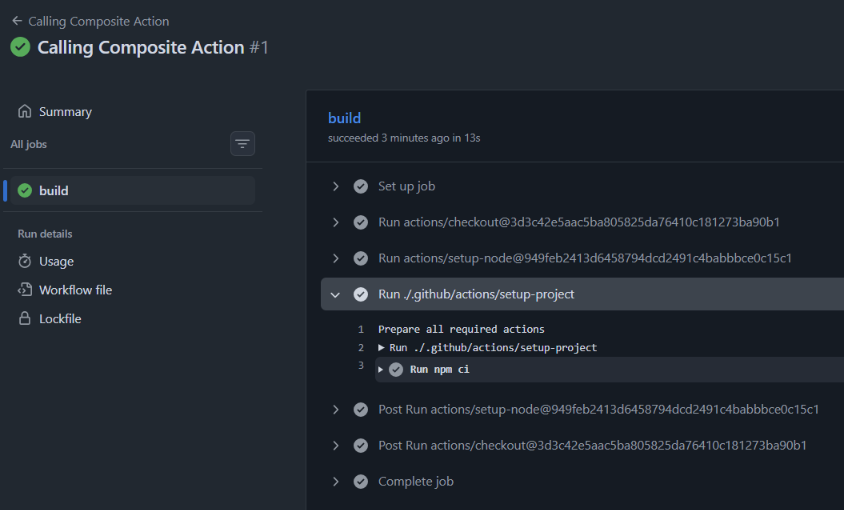
A reusable workflow shares whole jobs. A composite action shares a handful of steps inside a job. It lives in its own folder (setup-project, in the below case), in a file named action.yml:
name: Set up the project
description: Install the project's dependencies
runs:
  using: composite
  steps:
    - run: npm ci
      shell: bash
Use it from any job with one line per step:
steps:
  - uses: actions/checkout@3d3c42e5aac5ba805825da76410c181273ba90b1 # v7.0.1
  - uses: ./.github/actions/setup-project
Three things to remember:
- Every
runstep needs ashell. Without it, the action fails. - Check out first. A local action is read from your repository, so the checkout must come before it.
- It runs inside the caller’s job. It shares the same runner and files, and it can’t read the
secretscontext directly. Pass secrets in as inputs instead.
Which one should I use? If you are repeating a job, make a reusable workflow. If you are repeating a few steps, make a composite action. If you can’t decide, start with the composite action, because it’s smaller.
3. Runners:
Where your jobs run: So far every job used ubuntu-latest, a GitHub-hosted runner. GitHub starts a fresh virtual machine for each job and throws it away afterwards, which is why it's the right default.
| GitHub-hosted | Self-hosted | |
|---|---|---|
| Who maintains it | GitHub | You |
| Starts clean for every job | Yes | Only if you set it up that way |
| Special hardware (GPU, large memory) | Limited choices | Whatever you install |
| Reach a private network | No, unless you add extra setup | Yes, if the machine is inside it |
| Security responsibility | GitHub's | Yours |
Consider a self-hosted runner when you need hardware GitHub doesn’t offer, access to a private network, or a fixed software setup that’s slow to install on every run. Otherwise, stay with GitHub-hosted runners.
Self hosted runners can be added at Enterprise, Organization and Repository level. You can choose from Windows, Linux and macOS based on your machine where you want to install the runner.
Adding a runner at Org & Repo level: Go to Settings → Actions → Runners → New runner and follow the commands.
Choosing it in a workflow: A job picks a runner by its labels.
runs-on: [self-hosted, linux, x64, gpu]
At the organization level, you can target a runner group instead. A runner group is an administrative container in GitHub Actions used to organize runners and control which repositories or workflows have permission to use them.
runs-on:
  group: build-machines
  labels: [linux, x64]
If no online runner matches every label, the job waits in the queue.
Keeping it safe: A self-hosted runner executes whatever your workflows tell it to, on a machine you own. Treat it carefully:
- Private repositories only. On a public repository, a pull request from a fork could run their code on your machine.
- Use
--ephemeralwhen registering a runner. Each runner takes one job and is then removed, so nothing is left behind for the next job. - Keep the runner software current.
- Limit what the machine can reach. Give it only the network and cloud access its jobs need.
If you need runners that scale up and down automatically, look at Actions Runner Controller (ARC), which creates and removes runners on Kubernetes as jobs arrive.
4. Keeping shared workflows healthy:
A few habits stop shared code from becoming a shared problem.
- Pin what you share: When other repositories call your workflow, point them at a commit SHA, not a branch. A branch can change under them, and a bad change would reach every caller at once.
- Keep inputs small and checked: Treat inputs like any other untrusted text. Pass them into scripts through
env, and validate anything a person types. - Keep the action layer thin: Put real logic in scripts, such as
scripts/deploy.sh. Shared workflows then stay short, and you can run the same script by hand in an emergency. - Keep the workflow files tidy: Run
actionlinton every pull request, and enable Dependabot for your actions so pinned versions stay current.
Common errors and what they mean:
| Symptom | Likely cause | Fix |
|---|---|---|
workflow was not found |
Wrong path, a subfolder, or a wrong @ref |
Keep the file directly in .github/workflows/ and check the reference |
| Called workflow fails with a permissions error | The caller didn't grant what the called workflow requests | Add permissions: to the calling job |
| A secret is empty inside the called workflow | Secrets aren't passed automatically | Use secrets: or secrets: inherit |
environment is rejected on the calling job |
Not allowed on a job that uses uses: |
Move it into the called workflow and pass it as an input |
A composite action fails on a run step |
shell is missing |
Add shell: bash |
| A local composite action isn't found | No checkout before it | Run actions/checkout first |
| A job waits forever on a self-hosted runner | No online runner matches all labels | Check the runner's status and the runs-on labels |
Reusable workflows share jobs, composite actions share steps, and runners decide where it all runs. Start small: move one repeated job into a shared workflow, and only add your own runners when a real need appears.
That completes the series. You now have a pipeline that tests, secures, deploys, and maintains itself without copy-paste.
Part 1: GitHub Actions fundamentals and your first pipeline.
Part 2: Workflows in depth: triggers, conditions, environment variables, and debugging.
Part 3: Secrets, permissions, and securing your pipelines.
Part 4: Deployments: environments, approvals, and shipping to the cloud.
Part 5 (this post): Advanced patterns: reusable workflows, composite actions, and self-hosted runners.
Find all workflows used in this series on my GitHub Actions: Zero to Production repository.
About the author
- Senior DevOps Engineer @Canarys Automations | GitHub, AWS, Docker, K8s, Terraform, CI/CD | Accelerating infrastructure & automation using AI tools (Copilot, Claude).
Comments
Join the discussionNo comments yet. Be the first to comment.
GitHub Actions - Zero to Production
In this five-part series of posts, I would be sharing hands-on guide to GitHub Actions, from CI/CD fundamentals to production-ready pipelines. Each post pairs clear explanations with examples, so you can build, test, secure, and deploy your projects with confidence.